The Best Tracks by Anemone (Part Two)
Under certain circumstances, an iPhone or iPad user may find different apps to customize app icons in iOS; however, most of them are low-reputation apps, or simply don't work properly.
The fact is that Apple has never liked complete system customization and has been against apps that allow modification of the design of certain applications, and, although we have several alternatives in the App Store , the truth is that there are very few apps that allow us to customize the device on a large scale; in fact, it is already possible to add widgets to the notification center
Thanks to jailbreaking, with Anemone we can install themes on the device; now that we have jailbreaking, we can use this great tool that allows us to customize the springboard applications.
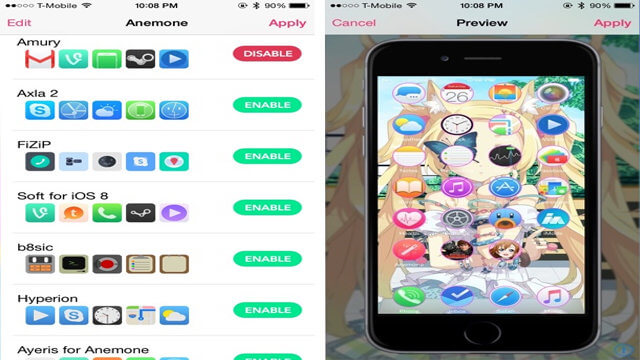
Based on the above, you must follow the steps shown in the video below exactly:
1. Have a jailbroken iDevice. If you don't have Cydia/jailbreak, see THIS ARTICLE to install it.
2. Access Cydia and after loading, search for the "Anemone" tweak.
3 Download and install Anemone, along with the desired themes (it must be queued)
4. After Respiring, access Anemone and select the theme you wish to apply.
By applying the themes, after restarting we will be able to see the changes in the springboard. It is worth mentioning that certain themes customize the springboard, the settings icons, the pop-ups, and even the boot logo (the Apple logo that appears when restarting).
You can get any support regarding what is written in this article through my Twitter account: @carloz_vallejo